How To Copy Text From Command Prompt On Windows

Command prompt tips and tricks


Here's a tutorial on how you can copy text from window's command prompt.

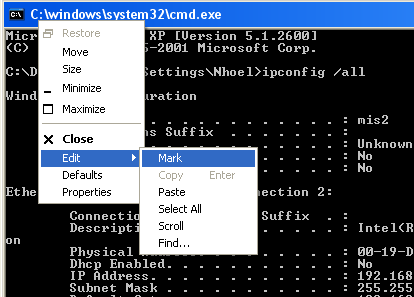
First, right click on the title bar, select Edit > Mark. Doing this will enable the highlight function of the command prompt. Now, you can highlight the desired text, then again right click on the title bar, select Edit > Copy. Shortcut to copy the text is to press the Enter key while the selected texts are highlighted.
copy text command prompt


The selected texts on the command prompt window is now on your clipboard, paste it on your desired application.

Is this tutorial helped you? You can confirm or disapprove below for the sake of other readers, thank you

How To Use Your Own Registered Domain With Blogger.com

Configure custom domain on blogspot blog at blogger.com


This blog is hosted at blogger.com, but like everyone else I also found the default domain name ugly. Having a 'blogspot' extension on your url address doesn't appeal on my taste, especially to my visitors, much more with search engines.

So I used blogger.com's custom domain name feature. As you can see, this blog is using my own paid domain name 'keywordspeak.com', and what's nice about this is that it is hosted my blogger.com. That means that I don't need to pay for a monthly hosting fee. Sure I can afford the monthly fee for hosting, I'm doing this before with godaddy.com. I found 2.45 dollars/mo very affordable, but if you can do it for free, then why not use it, right?

So, since this blog is a proof that you can use your paid domain name with blogger.com, then let's start discussing on how you can do it too.


I registered my domain name with godaddy.com, but you didn't have to worry if you have different registrars, the idea is still the same. All you need to do is to change the settings on your cname record. On godaddy, here's how I've done it, login to your godaddy account, click on 'Domain Manager' as shown on the figure below.

blogger.com custom domain


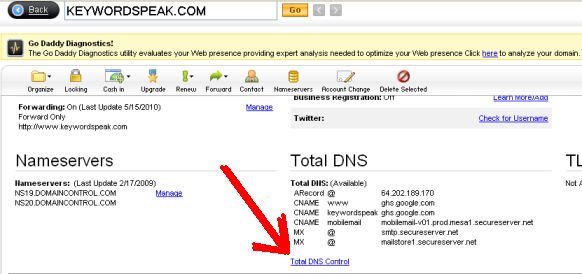
Next, click you domain name, then click the 'Total DNS Control' on the 'Total DNS' section as shown below.

godaddy.com custom domain name blogger.com
godaddy.com blogger.com custom domain
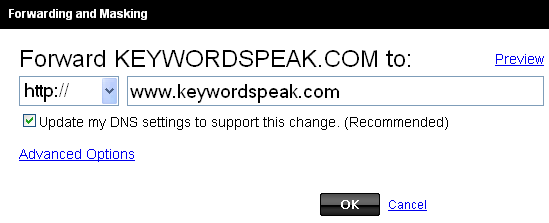
 Now, edit the entry on the 'www' entry and point it to ghs.google.com. This means that when your visitors type in www.yourdomain.com, blogger will load your blog. But what if your visitors just type in yourdomain.com ? To solve this, you must redirect yourdomain.com to www.yourdomain.com.

paid domain name blogger.com

paid domain name at blogger.com

Okay, we're done on the registrar part, next step is to make some simple configuration on our blog address at blogger.com. Login to your blogger account and go to Settings > Publishing, and click on the 'Custom Domain' link. Click on the 'Switch on advance settings' link. Now, enter your own/custom domain name on the text field as shown below.

domain name custom blogger

You can check the 'Redirect yourdomain.com to www.yourdomain.com' checkbox, we've done this on the registrar side but you can check it here, just to be safe. If the registrar side fails (which is not so likely) your setting here at blogger.com will back it up.

So that's it, your blog on blogger.com is now set-up using your own domain name.

Happy blogging at blogger.com!

Jejemon Phenomena Had Hit Philippines


Jejemon term is starting to spread here on the Philippines. Some like it, some hate it. But what is jejemon? Is it a term for a particular practice or a term used on some group of people?

Jejemon is usually used as a practice or to a person doing it . Jejemon usually appears on text forms.

Here’s an example of a jejemon:
"e0wSsZz pOwhhZzmUsZtAhH nUah pOwhHzz kEowHsz?"

Jejemon here in the Philippines is a hot discussion actively happening on facebook pages. As I have said, some love doing it, some hate seeing it as they refer it as a form of being jologs, baduy and awkward. Some simply don’t want it for readability reason.

Some said that jejemon rised because of unlimited text services on the country, “Nauso lang naman ang jejemon dahil sa unlimited texting, try niong magpaka-jejemon ng walang unli”.

Here’s some screenshot of a hot discussion about jejemon:


jejemon fever
jejemon phenomena
jejemon group

Free Pinay Celebrity Six Scandal - SEO Contest

LET'S WORK TOGETHER TO PUSH DOWN BAD WEBSITES ON SERP, HIJACK THE "PINAY TEEN CELEBRITY SCANDAL" KEYWORD.
-THE MINI SEO CONTEST.


I just decided to join the SEO contest that’s trending among Filipino bloggers. It seems that free pinay six scandal is one of the most search phrase on our country, Philippines. So I think that it’s my responsibility as a blogger to create a post intended for the free pinay celebrity scandal saga.

GOAL !
This post is intended to rank on search engines so that the real bad sites related to the free pinay celebrity scandal will be push down, google please help us.

I’M INVITED !
By marhgil macuha who initiated this mini seo contest three years ago (November 2007) with the goal stated above.

Concern About Google Adsense
I joined this contest after hearing this for about five months because I knew that google adsense doesn’t allow their ads on any pron site or any site that promote it or link on any pron related site. So, I don’t want to take the risk putting my adsense account in danger considering that getting your account back is very very hard. Also, self respect told me that if I will earn money online, I will do it without sacrificing my dignity, and I was thinking then "What will my friends and relatives will tell me if they see my scandalous post?". But when I discovered that you don’t need to promote any carn@l things by targeting these keywords, then I finally decided to join the contest, and here I am, huli man daw at magaling, nakakahabol din. And the question is “Am I magaling?”, that we will see with this experiment.

My Hardship
To date, bloggers who joined the FREE PINAY CELEBRITY SCANDAL contest is already huge. Meaning that I am very late to beat these early comers, considering that the posting date is one of the factor search engines like google are using on their ranking. But I knew that the time factor is not the only thing that these search engines are using. What are those? Who knows (do you?), what I know is that I will join the contest, do the best that I can, wait, and hope that I can get on top.

PROS
Being a late comer has some benefits. First, I am sure that this FREE PINAY SiX CELEBRITY SCANDAL SEO CONTEST is adsense safe because many bloggers have done their own post with google adsense codes on it. So it’s absolutely safe to say that it is a certified adsense safe. Second, you can make other site as a reference on how to do it, meaning you can do what they have done and even improve it. It’s like a game where they already shown their cards with you having the freedom to choose what kind of cards you’ll use and how to deal them.

Now, I’m done, the only thing left for me to do is to wait and hope that I made this right. SEO contest, here I come!
PUBLISH (click)

MORE UPDATES WILL BE POSTED AFTER THIS LINE:

How To Reset / Refresh Your Connection With SmartBro Canopy

smartbro

SmartBro with canopy limited or no connectivity problem / issue


I'm using smartbro canopy on our house since a lined internet connection doesn't still reached our place, actually we're two street away from the last terminal box of a wired isp(can you believe that?).

So, as a last resort, I'm using the smartbro with canopy service. Though I admit that I'm somewhat satisfied with it's performance, but your internet connection using smartbro with canopy can sometimes drop especially on peak hours.

Here's a solution on how to properly refresh or reset your internect connection with smartbro:


Step1.) Unplug your smartbro power adaptor (at least 10 seconds).
Step2.) With your computer: Start > Run > type: ncpa.cpl > Right Click and disable your Local Area Connection.
Step3.) Plug back your smartbro power adaptor.
Step4.) Enable back your Local Area Connection by double clicking the icon or right click > Enable.

Explanation:
You made two major resetting steps. One is you properly disconnected the power to the canopy since it is using a POL or power on lan, meaning that a 29.5 volts over the ethernet cable (that's the cable going to your canopy). And second, you had reset the session of your lan network to your computer, by disabling / enabling your local area connection.

DISCLAIMER:
Your connection will surely be fix doing this steps, however, in any case that you still can't reestablish your internet connection, then the problem could be on your internet service provider and not on your end. You can try your connection again after some minutes. Worst come to worst, you can contact *1888 using your smart sim since they don't allow direct communication to your local smartbro service maintenance team.
wordpress broken admin page hacked
My wordpress blog is hacked which causes my admin page broken. I found that a worm or some virus got to my computer, sitting and waiting for some ftp session. And when I did used ftp for my self-hosted wordpress site, it logged my username and password and sent it somehow to the hacker.

Cutting the story short, all of my php files was appended with <?php /**/ eval(base64_decode("aWYoZnVuY3Rpb25fZXhpc3RzKCdvYl...=="));?> codes on them. Decoding this base64 instruction reveals a functioning php code used by the hacker. And cutting the story shorter, I switched to blogger.com for my blog and just used my beloved old domain.


I didn't know exactly how the virus got to my pc because I'm using an updated Norton Symantec Endpoint antivirus. But suing them isn't possible, so life must go on and I just moved here on blogger.com.

There's a lot of degraded features from a self hosted wordpress blog compared here on blogger.com, like flexible themes, plugins and everything. But if all you need is to have a platform to write on, some space for a humble ads, and I think blogger.com is more than enough for what you need.

And hey, I trust Google anyway.

DISCLAIMER:
I'm not saying that you can't fix your wordpress blog when hacked. It's been on my mind switching on blogger.com long before, it's just that stupid hacker triggered it this time, blessing in disguise I'll say.

What Is A Caliper? Caliper Instrument Usage Explained

what is caliper

Caliper is a measuring tool used to measure two opposing sides of an object.

Caliper is an instrument commonly used to measure objects with sensitive accuracy demand. With this a digital caliper is used to create very accurate measurements.

Digital caliper usually came with digital screen that show the measurement digitally. The unit used on caliper instruments is usually millimeter.

Caliper is very useful in measuring the outside part of an object as well as its inside diameter. For example, caliper is more commonly used in measuring the hole’s diameter. Measuring holes diameter is more accurately done with a caliper tool, and having a digital caliper made the measurement more accurate.

With this, caliper is widely used in small businesses and even on large manufacturing companies.